 Meshport
Your client sent a STEP file. Meshport turns it into a clean mesh you can actually work with.
Flat faces as N-gons, curved faces as quad grids along their isolines, hard edges where the surfaces meet at an angle, UVs, and the whole assembly with its names, colours and instances - straight into Blender, 3ds Max, Houdini or Maya.
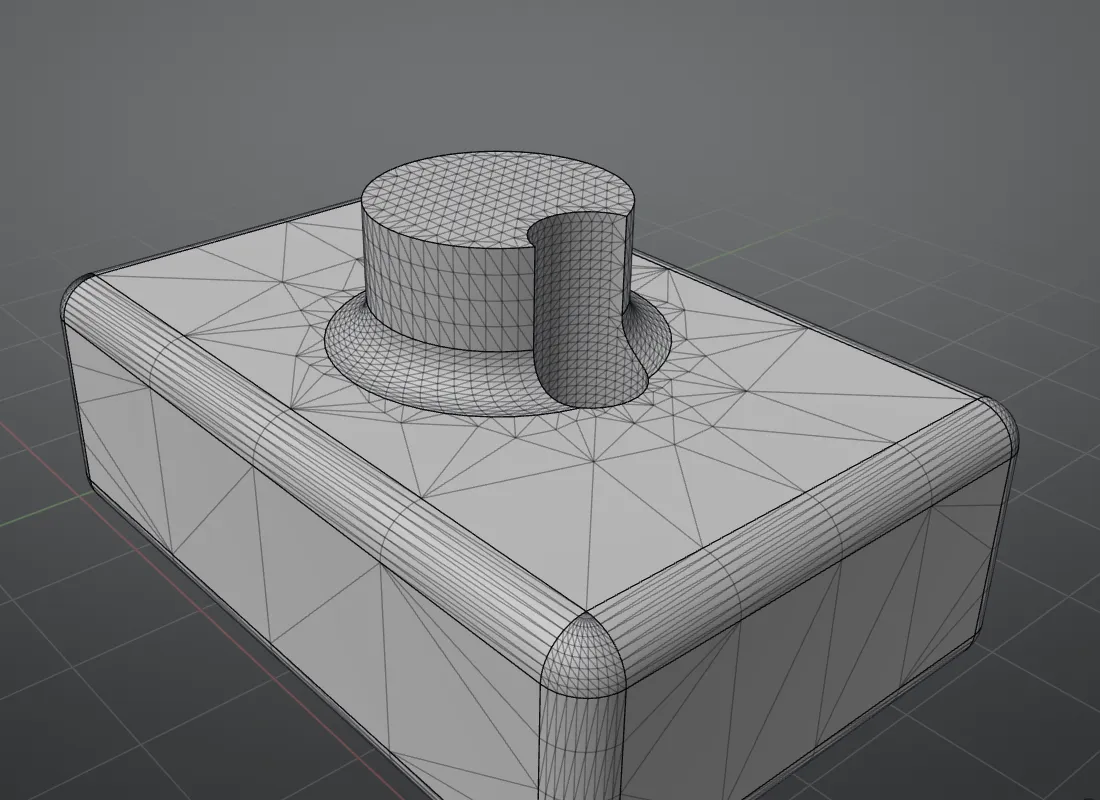
 Triangulated
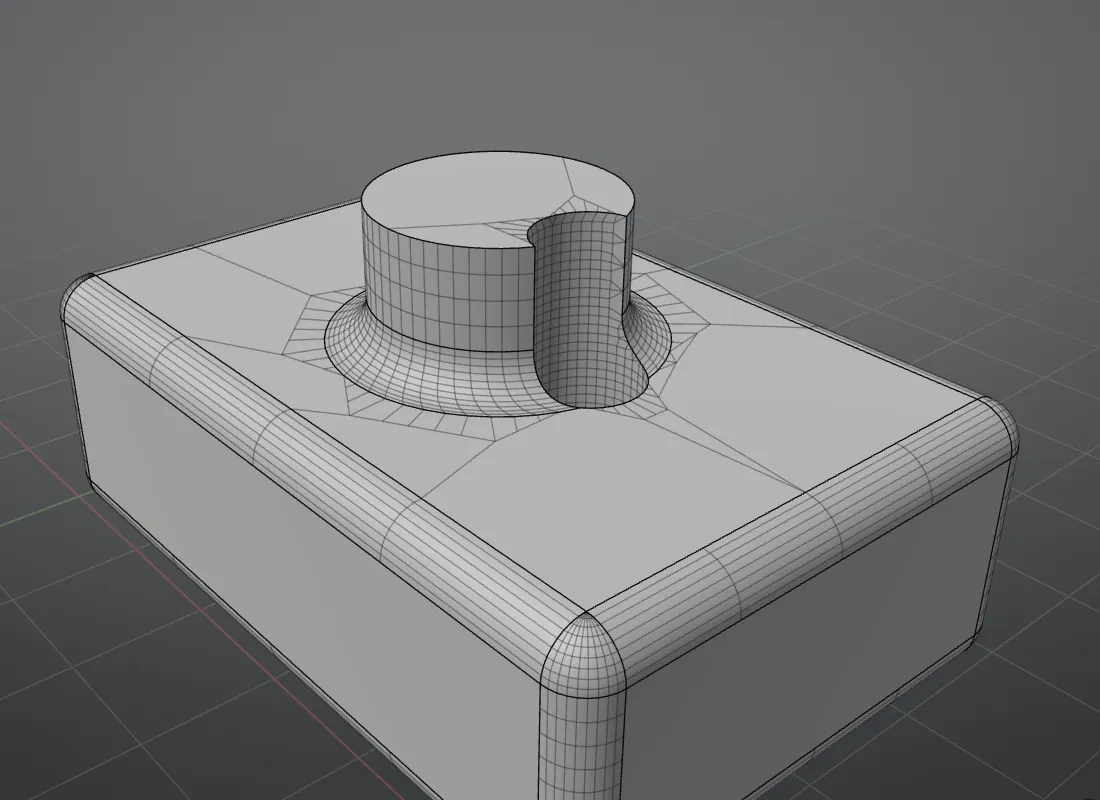
Meshport: N-gons + quads
Same part, same detail, wireframe on. Left: plain triangles (6,928). Right: Meshport (3,468 polygons, 95 % quads, watertight). Drag to compare.
Clean topology, not CAD soup
Meshport reads the CAD surfaces and builds an organised mesh – N-gons on flat faces, quad grids on curved ones – and keeps everything your scene needs.
Clean, organised topology
Flat faces as single N-gons (faces with holes, and concave outlines, as a few clean convex pieces; keep concave faces whole under Advanced), cylinders, cones, fillets, spheres and tori as quad grids along isolines, other trimmed surfaces mostly in quads. A "quads only" mode is there when you need it.
Watertight meshes
Every CAD edge is sampled once and shared by both faces, so closed solids come out without cracks - good for subdivision, booleans, baking and 3D printing.
Hard edges where they belong
A smoothing angle sets the crease: fillets stay smooth, sharp corners stay hard, with smoothing groups for 3ds Max.
The assembly survives
Hierarchy, part names, CAD colours as materials, and repeated parts kept as real instances (shared meshes) in FBX.
UVs ready
One island per face at real-world scale, islands joined across smooth edges where they unfold without stretch, or packed 0-1 / UDIM tiles. A UV checker preview shows the result before you export.
Live preview and density controls
See the mesh before you export: set the Detail and the polygon type (N-gons and quads, Quads only or Triangles), adjust the smoothing angle, and measure the deviation from the CAD surface.
One-click bridges
"Send to" buttons for Blender, 3ds Max, Houdini and Maya: set them up once with "Set up Send to…", which installs each program's add-on after telling you what it copies (the exact folders are under Details).
Built for real-world files
Faulty parts are healed or skipped with a clear message instead of stopping the whole file, and parts are meshed in parallel.
Bug report built in
Report bug collects a screenshot, your settings and the last steps into a .zip you e-mail us; your CAD file goes in only if you tick the box.
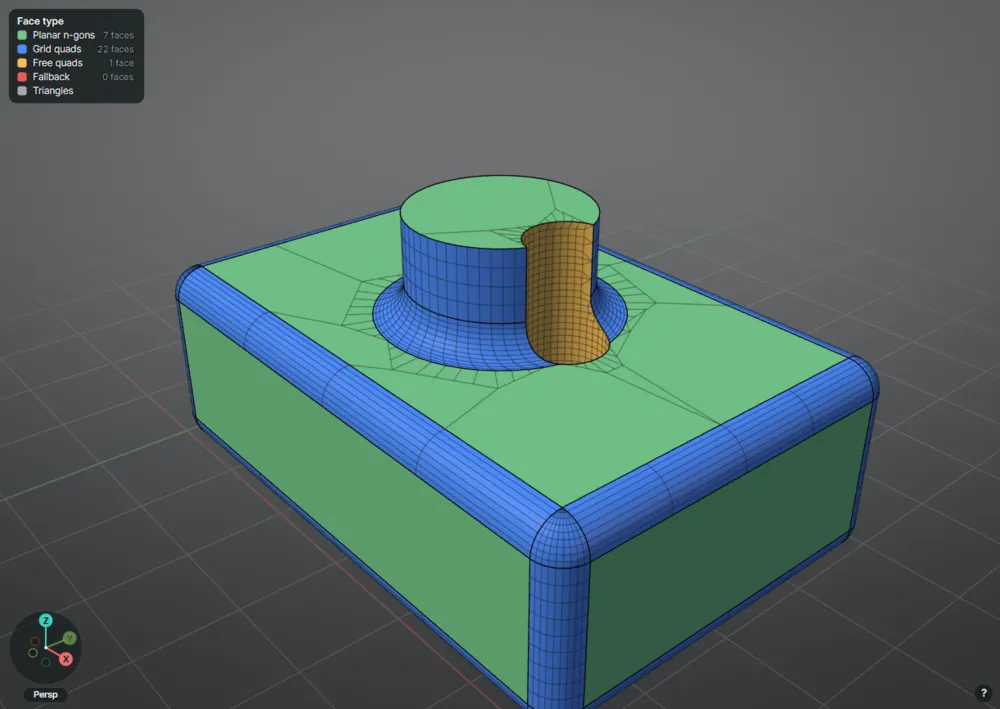
Each surface gets the right kind of mesh
- Planar faces become one N-gon each - no fan of slivers across a flat top.
- Cylinders, cones, fillets, spheres and tori become quad grids that follow the surface.
- Other trimmed faces are filled mostly with quads.
- The Face type view shows which is which before you export.
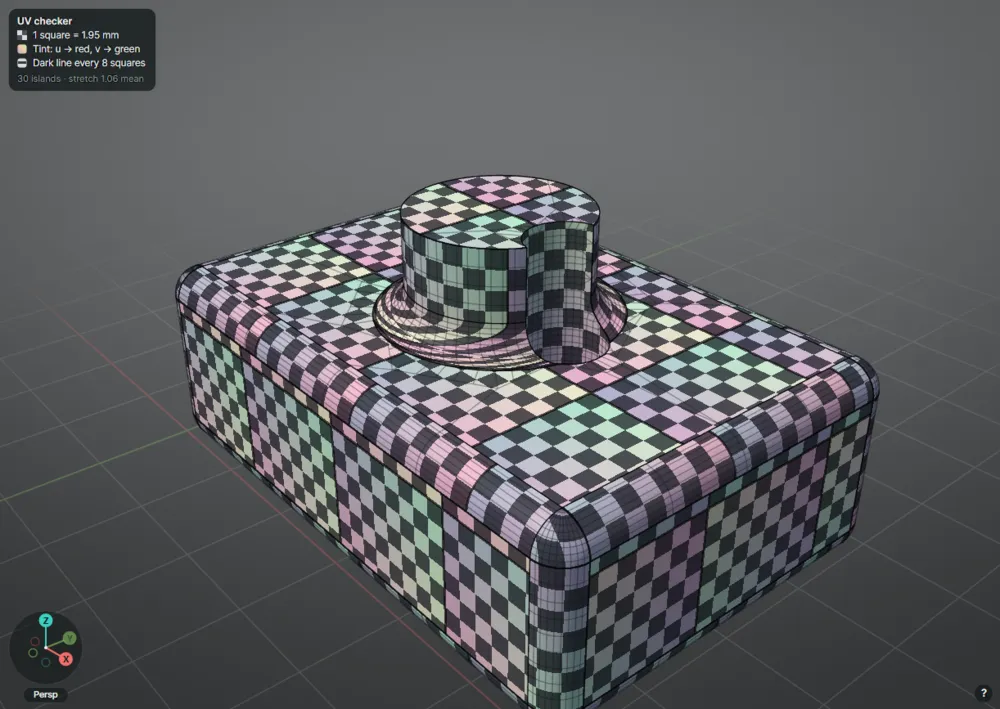
Ready to texture
- World-scale UVs: the same texel size on every part.
- Islands joined across smooth edges where they unfold without stretch.
- Or packed into 0-1 or UDIM tiles.
- Check it on the model with the UV checker shading.
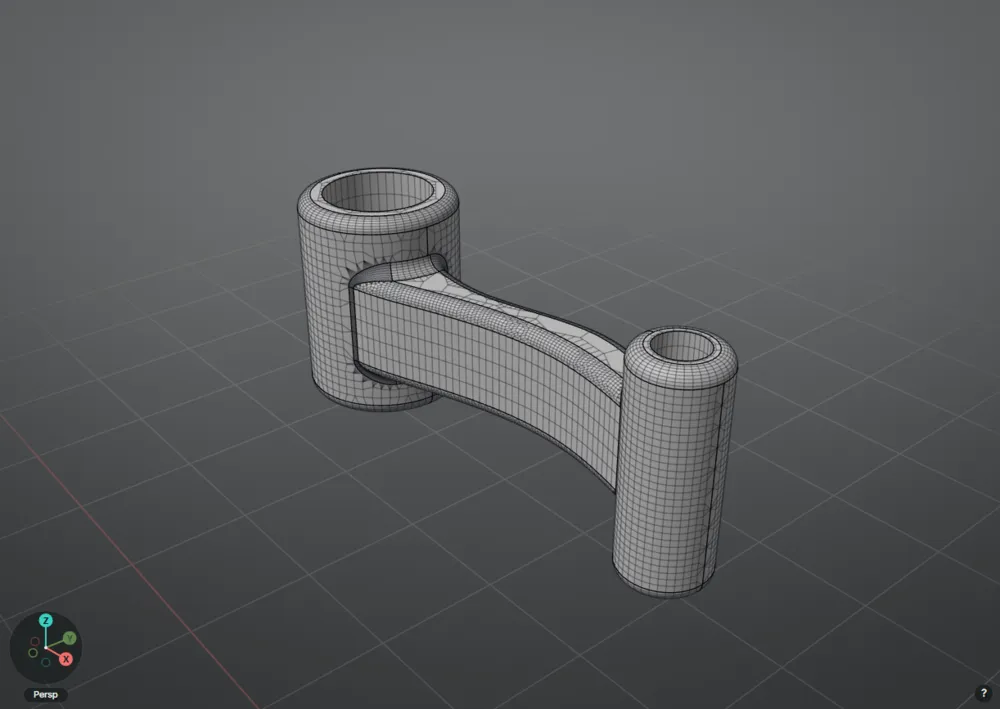
Clean enough to keep working on
- Closed solids with no cracks between faces.
- Hard edges set by the crease angle, smooth across fillets.
- Real-world size in millimetres, so it lands at the right scale.
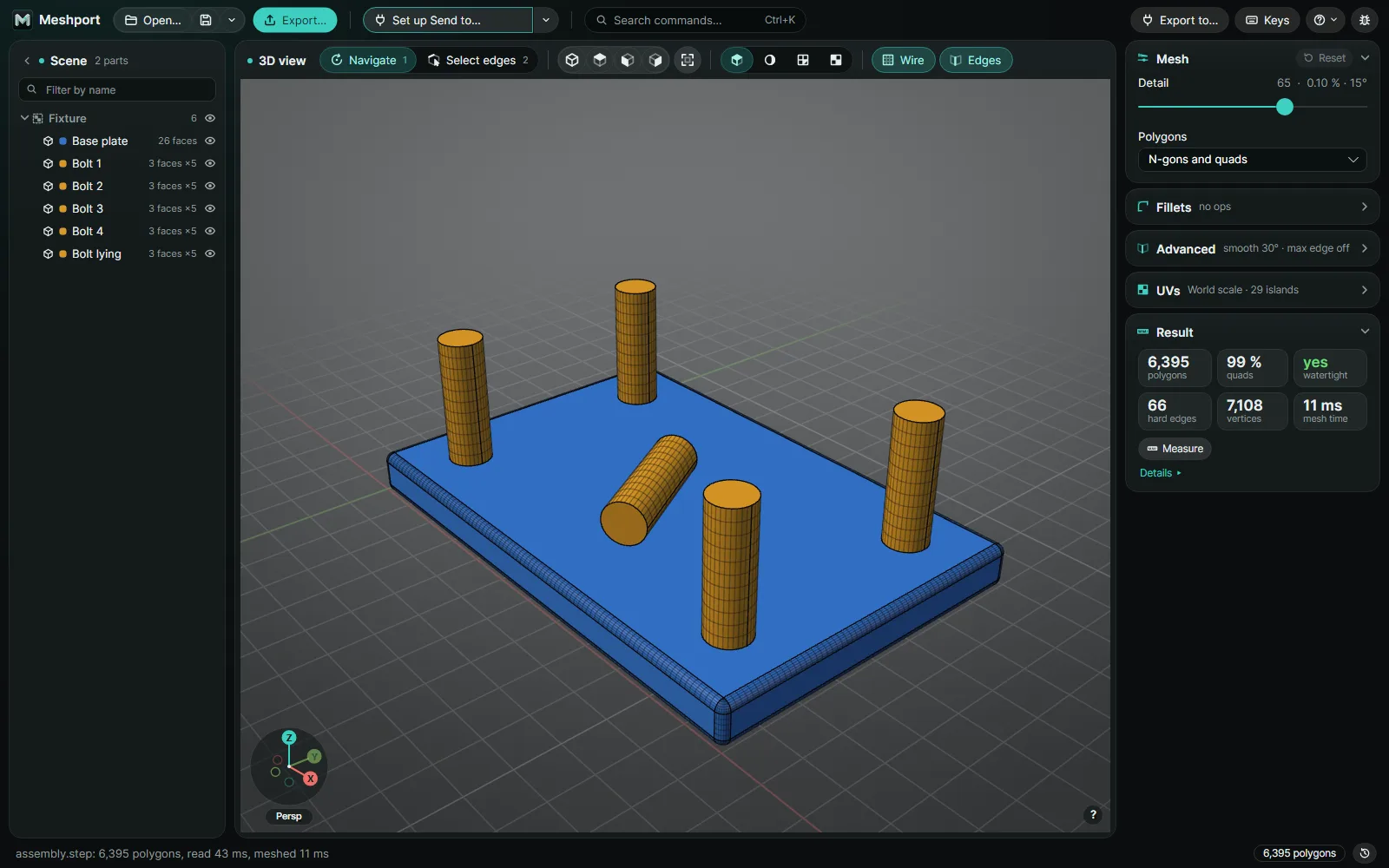
The scene tree keeps part names, colours and instances (x5 bolts share one mesh). The Result panel shows polygons, quad share and whether the mesh is watertight.
Straight into your 3D program
Exported files and one-click "Send to" bridges for:
The versions we tested are listed in the FAQ. Other programs that read FBX, OBJ or Alembic are likely to work too.
- STEP
- .step.stp
- IGES
- .iges.igs
- Assemblies included: tree, part names, part and face colours, instances.
- FBX
- Binary, with per-program profiles.
- OBJ + MTL
- One object per placed part.
- Alembic
- .abc
- Real-world size
- Millimetres, Z up in FBX / OBJ.
- Alembic
- Metres, centimetres or millimetres.
Three steps from STEP to scene
Open the CAD file
Open or drop a STEP or IGES file. Meshport reads the assembly and meshes every part in parallel.
Preview and adjust
Orbit the live 3D preview, set the Detail and the smoothing angle, check the face types and the UVs, and see the polygon count and watertightness in the Result panel.
Export or send
Save FBX, OBJ or Alembic - or click "Send to" and the mesh opens in Blender, 3ds Max, Houdini or Maya.
What you need
A Windows PC. That is it - no CAD package, no plug-in host.
- Windows 10 or 11, 64-bit. No macOS or Linux version.
- No CAD package needed.
- Internet to activate a trial key or a licence key; after that Meshport works offline for up to 30 days between checks.
- Installs per user, no administrator rights needed.
- Not code-signed yet: on first run Windows SmartScreen may warn you - click More info, then Run anyway.
Buy once. No subscription.
- One-off purchase - no subscription, no renewal. All future updates are included.
- Meshport checks once a day for a new version and shows a small "Update" button when one is out; your key activates every new version.
- Activate on up to 2 PCs in total, for personal or commercial work. Moving to a new PC? Contact us and we'll reset your activations.
- 15-day free trial: get the Setup and your own trial key by e-mail, no card needed. Paste the key into Help → Licence… and every feature works, export included, for 15 days from the day you get the key, on one computer. After that Meshport is view-only (open, mesh and preview; no export or Send to) until you paste a licence key into the same field - no reinstall needed.
- Everything you make with Meshport is yours.
Questions
Can I try it before I buy?
How does the licence key work?
Do I need to be online?
On how many computers can I use it?
Do I have to pay for updates?
Windows says "Windows protected your PC". Is that normal?
Which 3D programs does it work with?
Which CAD formats can it open?
Is there a Mac or Linux version?
Can I use it for commercial work?
What about refunds?
Meshport's meshing, UV and export pipeline is our own, built on the Open CASCADE Technology (OCCT) 7.9.3 geometry kernel, which is licensed under the GNU LGPL 2.1 with the Open CASCADE exception. OCCT is linked dynamically: its DLLs ship next to the program and you may replace or debug them. Its source is the upstream release tagged V7_9_3 (dev.opencascade.org / github.com/Open-Cascade-SAS/OCCT). Meshport also uses CDT (MPL-2.0), Alembic and Imath (BSD-3-Clause), Avalonia, SkiaSharp and .NET (MIT). The full licence texts ship with the program in THIRD-PARTY-NOTICES.txt and the licenses folder.
Blender, 3ds Max, Maya and Houdini are trademarks of their respective owners. Meshport is not affiliated with or endorsed by them.